
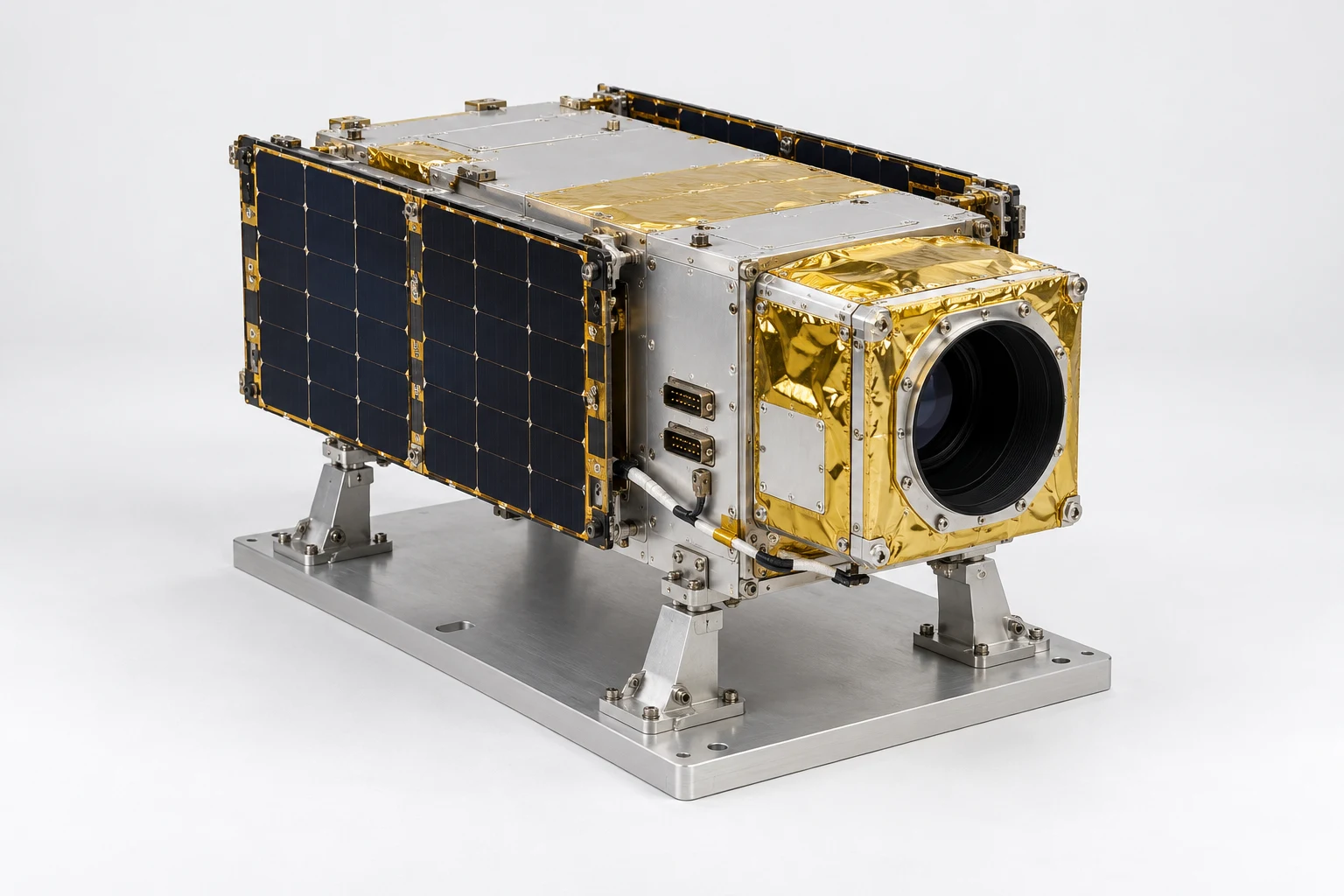
ESV-S01-SOP-01 · MODEL V5 · SIMULATION PROCEDURE
Optical payload removal and refit with a connector discrepancy
Remove and refit the optical payload during an unpowered ground-integration rehearsal. Resolve a conflicting connector instruction before releasing the harness and mount, then prove that the final configuration matches the approved starting state.
Before the exercise
Load the saved version 5 scene. The scenario owner supplies the harness map, isolated-power evidence, ESD condition, supported and parked poses, removal path and assessment tolerances. Keep a separate fixture root. No real hardware is energised.
- 01
Establish the task configuration
Match the spacecraft, fixture and optical payload to the saved version 5 starting configuration. Select the three correct objects and save the baseline pose.
Check Proceed only when all three identities and the task revision agree.
busbaseoptics - 02
Secure the ground support
Confirm all four support locations and put the simulated work package into the secured-fixture state. Keep the fixture independent of the spacecraft.
Check A missing or misidentified support prevents the removal sequence.
basefoot_rffoot_lffoot_rrfoot_lr - 03
Establish the unpowered work state
Identify all four connector positions and acknowledge the scenario's power-isolated and ESD-ready condition before disconnecting anything.
Check Power state is supplied by the scenario or an instrument record; the mesh does not prove it.
conn_ruconn_rlconn_luconn_ll - 04
Trace the intended harness
Follow the training-defined right harness from its connector to the optical payload. Compare the actual connector identity with the task card.
Check This fictional exercise maps the harness to conn_ru; an actual programme supplies its own mapping.
conn_rucable_rcable_r_sleeve - 05
Catch the planted discrepancy
Present a task card calling for the lower connector while the approved training configuration calls for the upper one. Learner must place a hold, capture both identities and request the reviewed correction.
Check Continuing with the lower connector is a critical error. The approved branch corrects the task card and resumes from this checkpoint.
conn_ruconn_rlcable_r_head_clip - 06
Open the access area
Select the right optical access cover, expose the cable retention area and identify the retaining clip. Use a declared detachable-cover animation if hinge travel has not been established.
Check Do not infer an engineered hinge axis or open the opposite-side cover.
optic_hatch_ropticscable_r_head_clip - 07
Release the harness in sequence
Release the simulated retention, disconnect the reviewed connector and move the right harness into the defined stowed position.
Check Record the selected parts and sequence; prevent pulling the payload while the harness remains connected.
cable_r_head_clipcable_r_sleevecable_rconn_ru - 08
Support and remove the optical payload
Set the supported-payload hold point, release the payload mount interface and withdraw the optical assembly along the authored removal path into its parked pose.
Check The mount cannot be released before the support acknowledgement. Fastener-level actions require separately addressable fasteners; do not invent them.
opticsS01-PMIbus - 09
Refit to the correct interface
Return the optical assembly to its saved baseline pose and align its mount interface with the bus. Reject a reversed or incomplete seating state.
Check Assess against declared simulation pose tolerances, not unsupported flight alignment claims.
S01-PMIopticsbus - 10
Restore the harness and retention
Reconnect the correct connector, restore the harness route and sleeve position, and re-engage retention in the reviewed order.
Check The lower connector remains a decoy. Missing retention or the wrong route prevents completion.
conn_rucable_rcable_r_sleevecable_r_head_clip - 11
Close and verify clearance
Restore the access cover. Check the harness/cover against both folded arrays and keep the objective in the no-contact zone.
Check Use reviewed geometric envelopes where available; visual appearance alone is not a clearance measurement.
optic_hatch_rsolar_rsolar_lobjective - 12
Demonstrate completion and hand over
Compare final and baseline configuration, review the discrepancy/recovery record and submit the evidence package for the next engineer.
Check Record identity, order, positions, hold resolution and required external test records. Do not infer torque, electrical continuity or powered performance from video alone.
S01-PMIopticsconn_rucable_r_head_clipbase
Assessment and completion
Score component identification 25, sequence 20, discrepancy handling 20, restored configuration 20 and evidence handover 15. Wrong-connector continuation, unsupported payload release or work before power-state confirmation prevents completion. Preserve both the original discrepancy and the accepted recovery.
Genesis authoring handoff
Bind the optics assembly, its cover, harness and mount to their actual component IDs. Configure supported, disconnected, parked, seated and retained states. Use declared detachable-cover and removal transforms; do not infer hinge travel or fastener-level actions from the mesh. Instrument results remain explicit scenario evidence.
Use the exact exported model and verify its import and component bindings before generation. This specification has not yet been executed as a Genesis lesson.
For concept-model training and authoring. Real hardware work uses the programme owner’s approved procedures and engineering limits.