
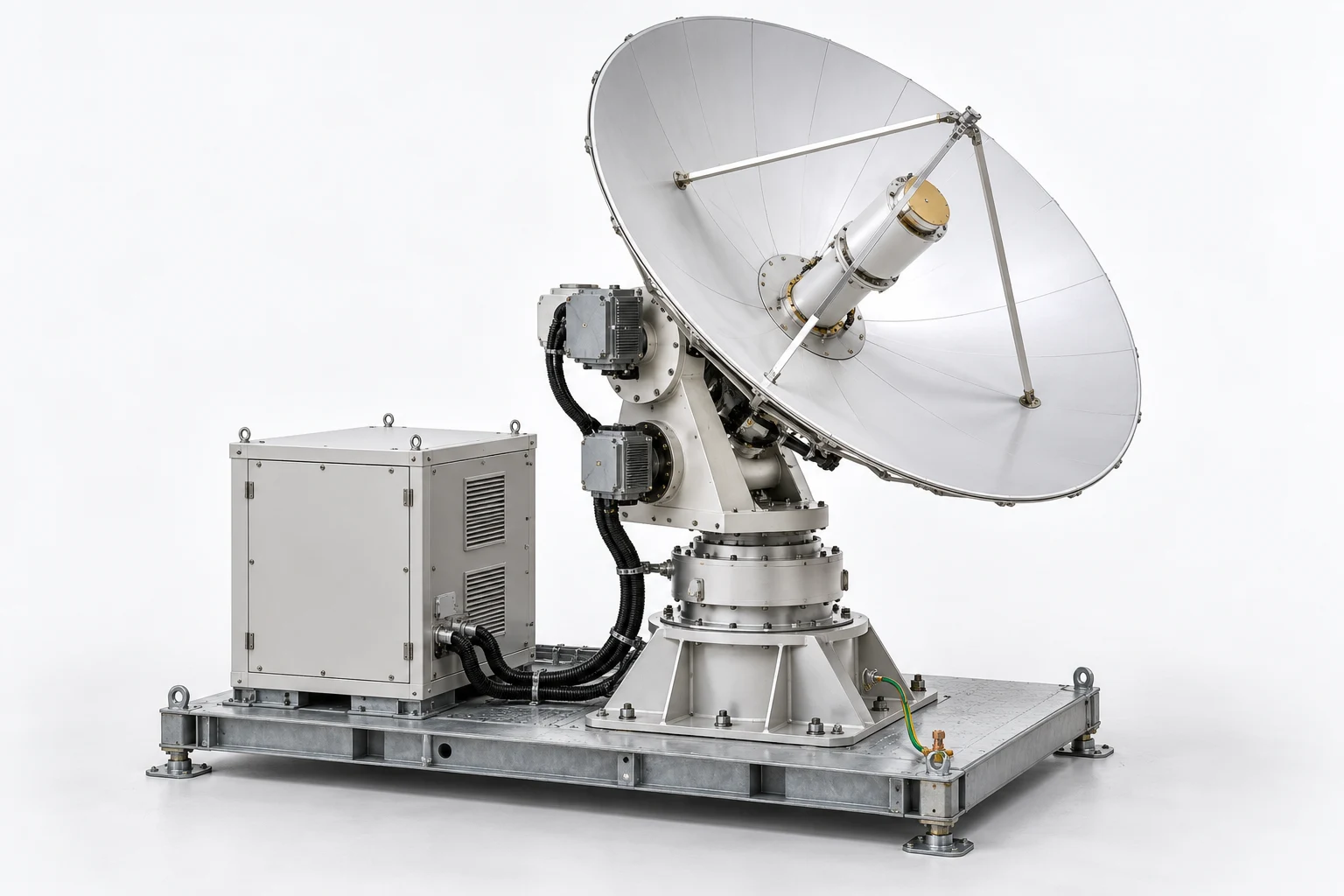
ESV-S02-SOP-01 · MODEL V3 · SIMULATION PROCEDURE
Antenna feed removal and alignment recovery
Rehearse removal and refit of the ground-terminal feed assembly while preserving reflector support and feed orientation. Resolve a misaligned-refit branch before accepting the terminal configuration.
Before the exercise
Use an inert terminal with RF transmission and drive motion disabled in the scenario. The author supplies the feed support state, reference alignment pose, grouped removal path, mating limits and simulated checkout evidence. The mesh does not establish RF performance.
- 01
Confirm the terminal configuration
Select the base structure, reflector and feed assembly. Save the baseline feed pose and identify the task revision and supported maintenance position.
Check A feed or reflector from a different model revision blocks the exercise.
skidpedestalreflectorfeed - 02
Establish the maintenance state
Review scenario evidence that transmission and drives are disabled. Confirm the antenna is held in the specified maintenance pose before approaching the feed.
Check Motion or RF state is an explicit record, not a conclusion from a static picture.
azimuthdrive_upperdrive_lowercabinet - 03
Identify the feed support chain
Trace the feed support from the reflector braces to the apex. Identify which objects belong to the removable feed group and which remain fixed.
Check Incorrectly selecting a reflector rib as the feed support fails the identification check.
feedbrace_topbrace_leftbrace_rightbrace_apex - 04
Record the cap and attachment baseline
Select the cap and visible attachment groups. Capture their accepted orientation and the stated release order before changing any simulated attachment state.
Check Unmodelled individual fasteners remain an attachment-group acknowledgement.
feed_capfeed_base_boltsfeed_mid_boltsfeed_cap_bolts - 05
Support the feed assembly
Set the supported-feed hold point and identify the prescribed temporary parked pose. Confirm the work envelope clears the reflector face.
Check Support confirmation must precede release of the feed attachment state.
feedbrace_apexbrace_top_pad - 06
Release the feed in sequence
Follow the authored attachment-group release sequence, retaining the fixed brace structure. Move the cap to its defined stow location if the exercise requires access.
Check Releasing the base before the required support and preceding states prevents progression.
feed_capfeed_cap_boltsfeed_mid_boltsfeed_base_bolts - 07
Remove and park the feed
Withdraw the complete feed group along the reviewed path and place it in the supported parked pose. Preserve the reflector and brace transforms.
Check A path through the reflector or a moved brace is an assessed error.
feedbrace_apexreflector - 08
Resolve the alignment discrepancy
Present a candidate refit pose reversed relative to the baseline. Place a hold, compare orientation references and select the approved correction.
Check The learner must reject the reversed pose before mating the feed.
feedfeed_capbrace_left_padbrace_right_pad - 09
Refit the feed to its baseline
Return the group along the approved path and seat it at the accepted reference pose. Restore the base attachment state while support remains active.
Check Pose acceptance uses declared simulation tolerances; it is not a measured RF alignment result.
feedbrace_apexfeed_base_bolts - 10
Restore the cap and attachment groups
Restore the intermediate attachment and cap states in the reviewed order. Confirm no retained item remains in the operating envelope.
Check Missing cap or attachment acknowledgement prevents return-to-service acceptance.
feed_mid_boltsfeed_capfeed_cap_bolts - 11
Review the terminal checkout record
Compare the supplied alignment and checkout record with the exercise criteria. Link it to the restored feed pose and current terminal configuration.
Check A successful-looking model does not replace an alignment or RF test record.
feedreflectorazimuth - 12
Hand over the restored assembly
Submit the baseline, supported-removal sequence, alignment hold, corrected pose and checkout evidence for review.
Check Completion requires fixed supports unchanged, feed restored and the discrepancy resolved.
feedbrace_apexreflectorcabinet
Assessment and completion
Score correct group identification 20, support and release sequence 25, alignment-discrepancy recovery 25, final configuration 20 and handover 10. Unsupported release, reflector collision or acceptance of the reversed pose prevents completion.
Genesis authoring handoff
Bind the feed and cap to explicit removable groups and retain the brace hierarchy. Supply supported and parked poses plus an authored removal path. Treat bolt sets as selectable groups where the mesh has no separate fasteners. Do not infer mechanical joint travel or RF accuracy.
Use the exact exported model and verify its import and component bindings before generation. This specification has not yet been executed as a Genesis lesson.
For concept-model training and authoring. Real hardware work uses the programme owner’s approved procedures and engineering limits.