
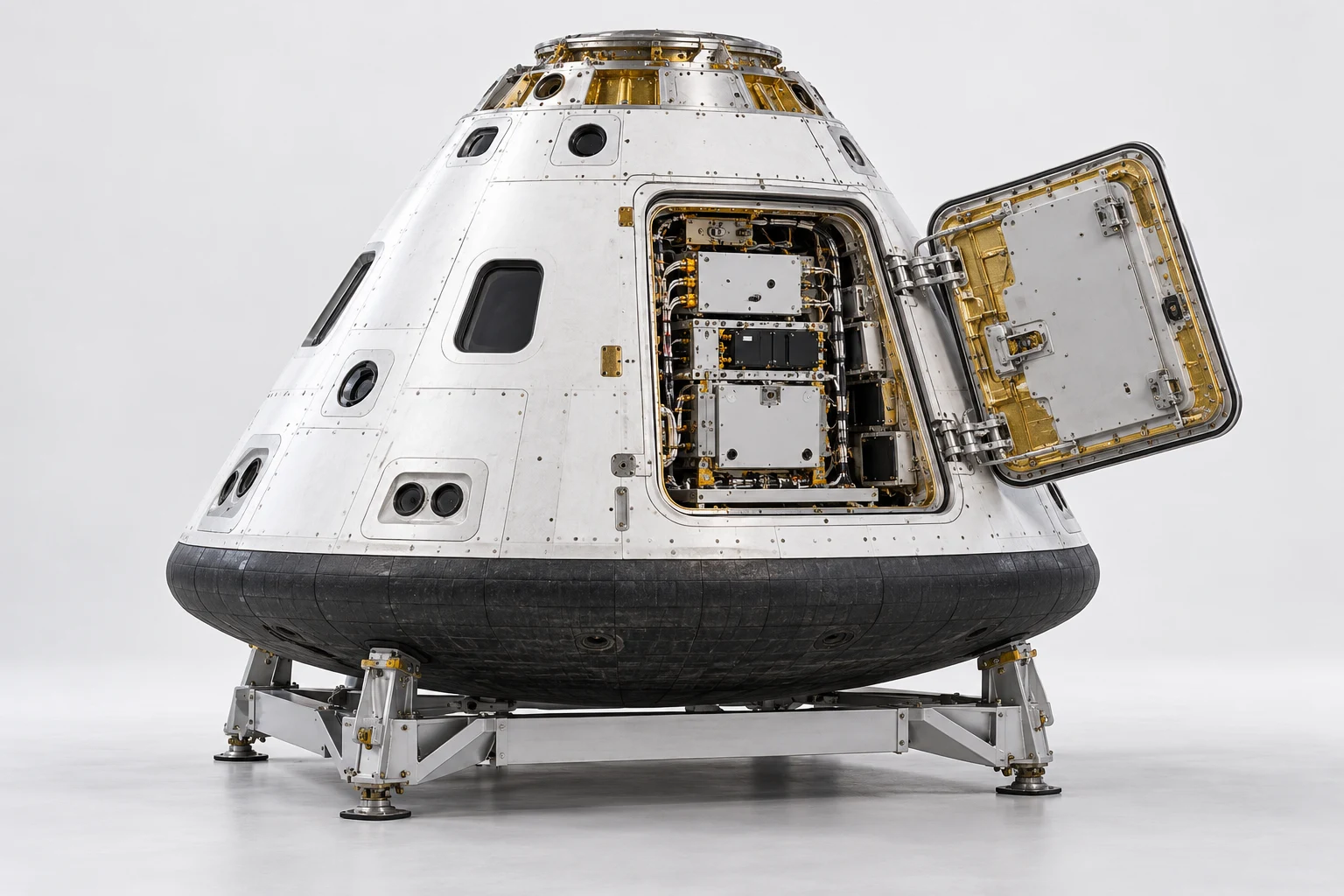
ESV-S03-SOP-01 · MODEL V3 · SIMULATION PROCEDURE
Capsule service bay module exchange and recovery
Rehearse exchanging the upper service bay module while preserving connector identity, harness routing and door clearance. Resolve a deliberately conflicting connector instruction before the capsule is handed back.
Before the exercise
Use the inert, unpressurised capsule concept on its cradle. Supply a reviewed training mapping for the two connector banks, saved module poses and a detached parking position. Live electrical work and pressure systems are outside this exercise.
- 01
Confirm the work configuration
Match the capsule, cradle and service bay to the saved starting state. Record the asset and task revision before opening the work package.
Check The learner identifies all three objects and the correct model version.
capsulecradleservice_bay - 02
Establish the isolated state
Select both connector banks and acknowledge the scenario supplied unpowered state. Identify the harness that must remain undisturbed.
Check Isolation is an explicit scenario or instrument record; appearance is insufficient.
bay_upper_connector_bankbay_lower_connector_bankbay_harness_left - 03
Release the service door
Release the two simulated door latches in the authored sequence. Retain the door in its closed pose until both releases are recorded.
Check A retained latch prevents the opening step and produces a clear hold.
doordoor_latch_upperdoor_latch_lower - 04
Open the access envelope
Move the door through the reviewed training opening animation. Keep its tube connection inside the declared clearance envelope.
Check The animation uses authored geometry and axes, not an inferred physical hinge rating.
doorhinge_upperhinge_lowerdoor_tube - 05
Identify the replacement target
Select the upper module and compare its identity with the task card. Preserve the middle and lower modules in their starting states.
Check Choosing a neighbouring module is rejected before any disconnection.
bay_upper_modulebay_middle_modulebay_lower_module - 06
Resolve the connector discrepancy
Present an instruction naming the lower connector bank for the upper module. Place a hold, capture both labels and obtain the reviewed training correction.
Check Continuing with the lower bank is a critical error; the correction must be recorded.
bay_upper_connector_bankbay_lower_connector_bankbay_upper_module - 07
Release the module connections
Disconnect the reviewed training interface and park the associated harness using its authored stowed state. Keep the door tube and neighbouring bank untouched.
Check Module movement remains blocked until the required disconnect and stow events exist.
bay_upper_connector_bankbay_harness_rightbay_upper_module - 08
Withdraw the upper module
Move the upper module along the authored rail path to its supported parking pose. Compare its envelope with the bay rim throughout the path.
Check A misaligned withdrawal branches to stop and restore the last accepted pose.
bay_upper_modulebay_railbay_silver_rim - 09
Seat the replacement configuration
Return the same module mesh as the reviewed replacement state. Align it with the saved rail datum and confirm its seated pose.
Check The replacement identity is scenario metadata; the mesh does not establish a real spare.
bay_upper_modulebay_railbay_gold_rim - 10
Reconnect and restore the harness
Reconnect the corrected upper bank and restore the right harness. Compare the untouched left harness with its baseline.
Check The correct bank, route and module seating must all pass before closure.
bay_upper_connector_bankbay_harness_rightbay_harness_left - 11
Restore the service door
Restore the tube clearance, close the door and engage both latches. Reject closure if the parked harness still occupies the door envelope.
Check Latch states and door pose are recorded separately; a closed appearance is insufficient.
doordoor_tubedoor_latch_upperdoor_latch_lower - 12
Complete the module handover
Submit the module identity, connector correction, final poses and closure evidence. Hand the simulated capsule back in its approved training configuration.
Check Completion requires resolved holds, intact neighbouring states and the full action sequence.
bay_upper_modulebay_upper_connector_bankdoorcradle
Assessment and completion
Score component identification 25, dependency order 20, discrepancy handling 20, restored configuration 20 and evidence 15. Wrong bank selection after the hold or module withdrawal before disconnection prevents completion.
Genesis authoring handoff
Bind every label to the actual S03 GLB mesh. Author module withdrawal and door motion as reviewed keyframes, with explicit envelopes and parking states. Engineering isolation, real spare identification and connector pin functions must come from programme sources.
Use the exact exported model and verify its import and component bindings before generation. This specification has not yet been executed as a Genesis lesson.
For concept-model training and authoring. Real hardware work uses the programme owner’s approved procedures and engineering limits.