
An EON AI Ventures company ↗
CompanyInvestors & partnersResources3D modelsImage gallery

THE SPACE 3D MODEL LIBRARY

From a picture.
To a world of possibilities.

Seven interactive models, created with headless Mirror Direct. Rotate the hardware, explore its named components and compare the original views. Three twelve-step procedures accompany each model, ready to review for the next Genesis and EON Live exercises.

073D MODELS
631NAMED COMPONENTS

Space hardware, made explorable.
84 original reference views included.

S04 / Robot IQ for Space

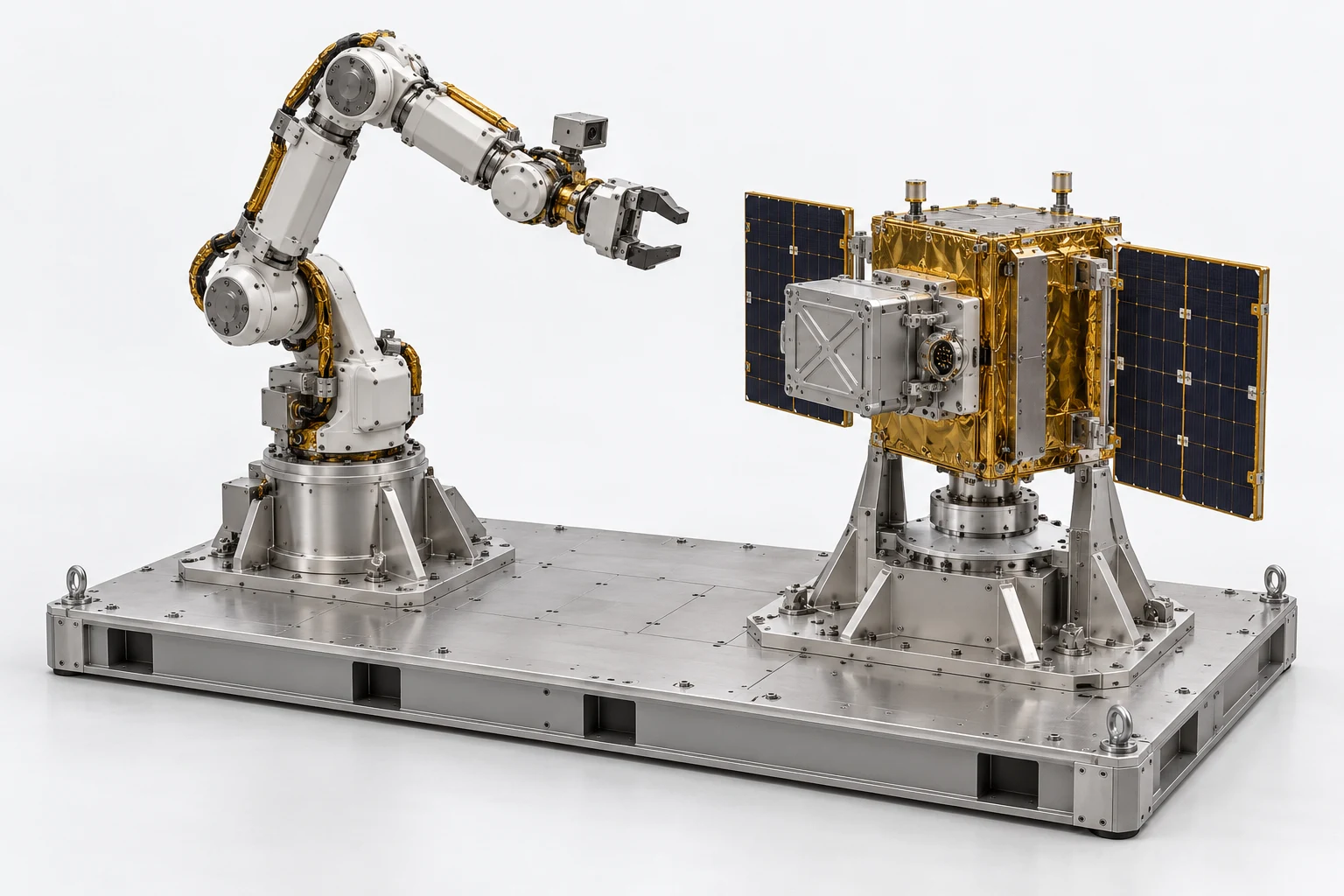
Robot servicing workcell

MODEL V3
102 named components
Robot servicing workcellINTERACTIVE 3D · V3
Loading 3D model
0%

Drag to orbit · Scroll or pinch to zoom

Download GLB ↗
Explore 102 named components +

These are the component identifiers in the exported model, ready to map to reviewed procedure steps.

  • bench
  • robot
  • satellite
  • bench.bottom
  • bench.front
  • bench.rear
  • bench.left
  • bench.right
  • eye.FL
  • eye.FR
  • eye.RL
  • eye.RR
  • robot.mount
  • robot.base.cover
  • robot.shoulder.support
  • robot.shoulder
  • robot.upperarm
  • robot.elbow
  • robot.forearm
  • robot.wrist
  • robot.roll
  • gripper
  • robot.camera
  • robot.harness
  • robot.cable
  • sat.mount
  • sat.top
  • sat.bottom
  • sat.railL
  • sat.railR
  • sat.post1
  • sat.post2
  • sat.payload.mount
  • sat.payload
  • sat.socket
  • solar.L
  • solar.R
  • solar.hingeLU
  • solar.hingeLL
  • solar.hingeRU
  • solar.hingeRL
  • solar.pinL
  • solar.pinR
  • eye.FL.foot
  • eye.FR.foot
  • eye.RL.foot
  • eye.RR.foot
  • robot.junction
  • sat.side.stripF
  • sat.side.stripR
  • robot.harness.clamp.lower
  • robot.harness.clamp.arm
  • robot.pedestal
  • robot.pedestal.bolts
  • robot.gusset1
  • robot.gusset2
  • robot.gusset3
  • robot.gusset4
  • robot.shoulder.cap
  • robot.upperarm.lower
  • robot.upperarm.upper
  • robot.elbow.cap
  • robot.forearm.collar1
  • robot.forearm.collar2
  • robot.wrist.screws
  • gripper.upper
  • gripper.lower
  • robot.camera.lens
  • robot.camera.bracket
  • sat.plinth
  • sat.turntable
  • sat.turntable.bolts
  • sat.supportL
  • sat.supportR
  • sat.gussetFL
  • sat.gussetFR
  • sat.gussetRL
  • sat.gussetRR
  • sat.payload.lid
  • sat.payload.rib1
  • sat.socket.insulator
  • sat.socket.pins
  • solar.L.cells
  • solar.R.cells
  • robot.shoulder.cap.inner
  • robot.elbow.cap.inner
  • sat.supportRL
  • sat.supportRR
  • sat.payload.latchRU
  • sat.payload.latchRL
  • sat.payload.latchLU
  • sat.payload.latchLL
  • sat.socket.mountflange
  • robot.pedestal.lowerbolts
  • robot.mount.holddowns
  • sat.supportL.foot
  • sat.supportR.foot
  • sat.supportRL.foot
  • sat.supportRR.foot
  • sat.spindle.upperbolts
  • gripper.upper.pivot
  • gripper.lower.pivot

THE OPERATION TO EXPLORE

Robot IQ for Space

Explore a bounded robot task with the correct hardware, perception, limits and recovery steps.

Explore the use case

FROM THE MODEL TO THE WORK

Three operations to rehearse.

Explore a complete procedure for this model. Each connects named components to a sequence, a difficult decision, recovery and evidence of completion.

Share this model and its procedures ↗

ESV-S04-SOP-01 · MODEL V3 · SIMULATION PROCEDURE

Robot payload exchange with a controlled handoff

Rehearse a supervised robot exchanging a satellite payload while coordinating gripper state, payload latches, socket identity and support responsibility. Stop and recover from a false release indication.

Before the exercise

Use the unpowered workcell concept and authored robot poses. The learner runs a simulation, not a physical robot. Supply reviewed approach, grasp, parked and seated states; verified kinematics and force control are not assumed.

  1. 01

    Confirm the workcell configuration

    Match the bench, robot and satellite to the saved training configuration. Confirm the correct payload exchange task and model revision.

    Check All three identities must agree before any robot movement.

    benchrobotsatellite
  2. 02

    Establish the supervised mode

    Confirm the scenario supplied supervised, energy isolated training mode. Identify the shoulder and elbow groups used by the authored pose sequence.

    Check This acknowledgement does not establish real robot safety functions or joint limits.

    robot.base.coverrobot.shoulderrobot.elbow
  3. 03

    Identify the payload interfaces

    Select the payload, mounting interface and socket. Compare their identity and starting state with the training task card.

    Check The learner must distinguish payload from supporting satellite structure.

    sat.payloadsat.payload.mountsat.socket
  4. 04

    Prepare the gripper approach

    Move to the reviewed approach pose with both jaws open. Check the gripper envelope against the payload before proceeding.

    Check Approach stops at the authored boundary; no force based grasp is inferred.

    grippergripper.uppergripper.lowerrobot.wrist
  5. 05

    Confirm the grasp evidence

    Apply the simulated grasp state and record jaw and payload relationship. Require an independent support acknowledgement before releasing the satellite interface.

    Check A closed jaw appearance alone is not accepted as a supported payload.

    gripper.uppergripper.lowersat.payload
  6. 06

    Release the four payload latches

    Release each latch in the authored sequence while the payload remains supported. Keep the latch evidence separate from the gripper state.

    Check An unreleased latch blocks withdrawal.

    sat.payload.latchRUsat.payload.latchRLsat.payload.latchLUsat.payload.latchLL
  7. 07

    Recover the false release indication

    Present a task indication saying all latches are released while one latch state remains engaged. Hold and compare the actual state record with the instruction.

    Check Continuing withdrawal through the retained latch is a critical error.

    sat.payload.latchRLsat.payloadgripper
  8. 08

    Withdraw to the parked pose

    Resolve the latch state, then move the supported payload along the reviewed withdrawal path. Park it without disturbing the satellite socket.

    Check The path requires clear latch, support and socket separation states.

    sat.payloadsat.socketrobot.forearmgripper
  9. 09

    Reintroduce the replacement state

    Return the payload mesh as the scenario defined replacement state. Approach the mounting interface in the saved orientation.

    Check Replacement identity is explicit scenario metadata, not proof of a different physical spare.

    sat.payloadsat.payload.mountsat.socket
  10. 10

    Seat and latch the payload

    Seat to the authored datum and engage all required latch states. Confirm the socket interface before transferring support back to the satellite.

    Check An incomplete seating or latch record prevents support transfer.

    sat.payloadsat.payload.mountsat.payload.latchRUsat.payload.latchLL
  11. 11

    Release and retreat the gripper

    Confirm satellite support, open the gripper and follow the reviewed retreat pose sequence. Leave the payload and mount in their accepted states.

    Check The gripper cannot release before the receiving support state is established.

    gripper.uppergripper.lowerrobot.wristsat.payload
  12. 12

    Submit the exchange evidence

    Submit the pose sequence, latch events, support handoffs and fault recovery. Return the workcell to its named ready configuration.

    Check Complete only when all holds are resolved and the payload is independently retained.

    sat.payloadsat.socketrobotbench

Assessment and completion

Score object identification 20, support and latch dependencies 30, fault handling 20, restored configuration 15 and evidence 15. Unsupported release or withdrawing against an engaged latch stops completion.

Genesis authoring handoff

Bind robot, gripper and payload objects to reviewed keyframes and explicit state transitions. Validate parent groups and child transforms before export. This exercise does not send robot commands or demonstrate validated grasp forces.

Use the exact exported model and verify its import and component bindings before generation. This specification has not yet been executed as a Genesis lesson.

For concept-model training and authoring. Real hardware work uses the programme owner’s approved procedures and engineering limits.

All seven models. All 21 procedures.
Word, HTML, TXT and JSON in one portable package.

Download the SOP library ↓

THE NEXT CHAPTER OF THE LOOP

Hardware you can explore.
Work you can rehearse.

The model library now includes 21 procedures: three per model, each with named components, decisions, recovery and assessment. The next step is a reviewed generation test with Genesis, EON Live and Field-IQ.

Bring one asset and one meaningful task ↗
  1. 01

    Images become explorable hardware

    Headless Mirror Direct turns the reference pack into a textured 3D asset with named components.

  2. 02

    Give the model a meaningful operation

    Connect several components to a reviewed procedure, decisions, a recovery path and clear evidence of completion.

  3. 03

    Rehearse, guide and keep the learning

    Develop Genesis exercises and appropriate EON Live behaviour. Carry accepted procedures into guided performance and reviewed mission memory.

About the model library

These are interactive 3D reconstructions of our Space hardware concepts, exported from Mirror Direct on 25 October 2026. Geometry and scale support demonstration and authoring; physical procedures and engineering values require programme review. The models are not flight-qualified equipment.

The reference tab contains AI-generated concept images. Its exterior orbit plays eight stills in sequence. The 3D tab loads the actual GLB and supports free rotation and zoom. New Genesis and EON Live examples will be linked as their working outputs are reviewed.