
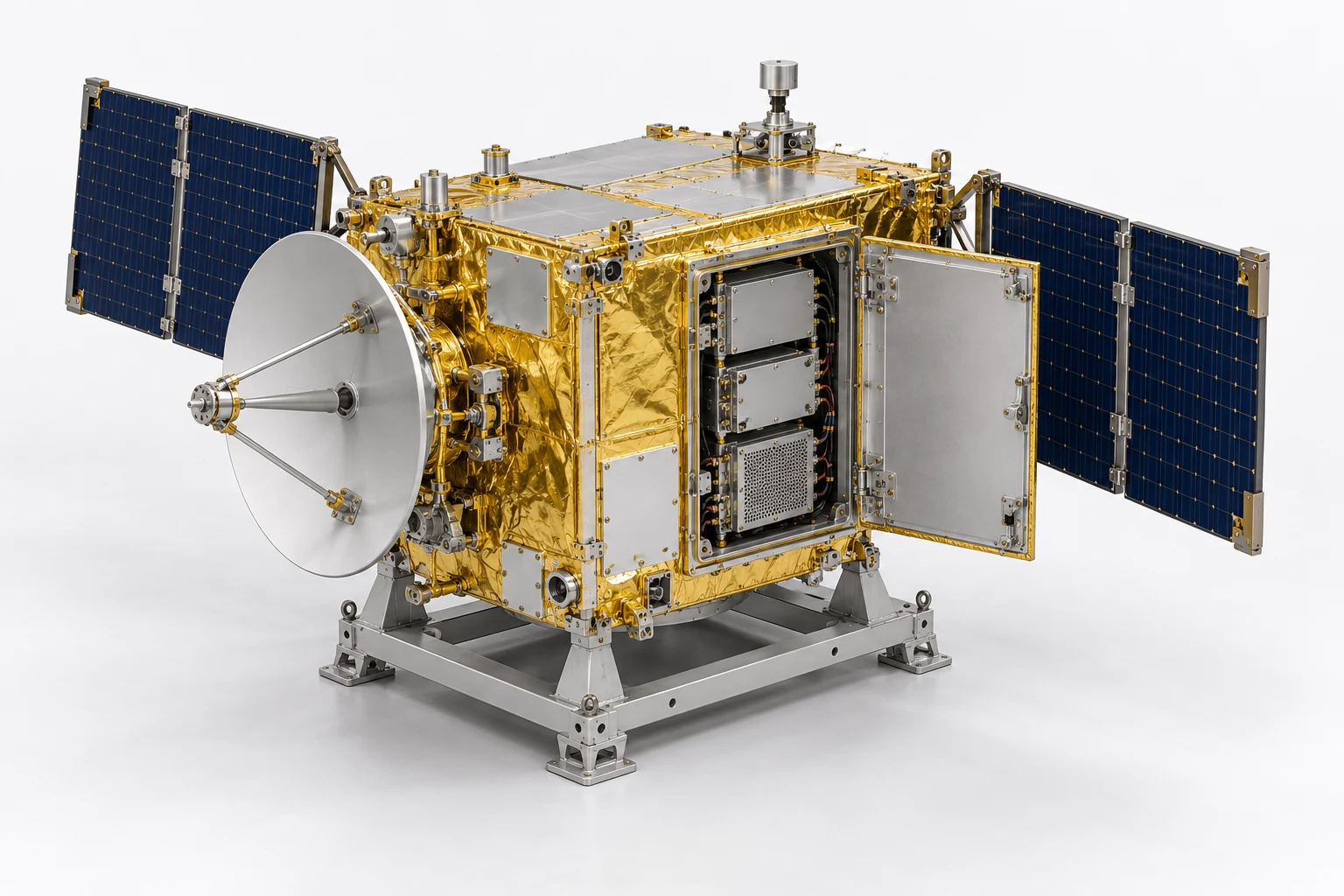
ESV-S05-SOP-01 · MODEL V4 · SIMULATION PROCEDURE
Service module exchange with connector recovery
Rehearse exchanging the middle bay module while maintaining spacecraft support and preserving the intended harness configuration. Resolve a wrong-connector instruction before restoring the bay.
Before the exercise
Use the unpowered serviceable-satellite concept on its ground stand. Record the starting model pose and a training connector map approved by the exercise author. Supply module support, removal path, connector pairing and completion criteria as scenario data; the geometry alone does not establish them.
- 01
Identify the supported assembly
Select the spacecraft, its independent stand and the middle service module. Match the model version and save the starting configuration.
Check The stand remains fixed; a different module identity prevents progression.
standbusbay.module2 - 02
Establish the work state
Read the supplied isolation record and place the exercise in its unpowered maintenance state. Identify both harness routes before opening the bay.
Check Require the recorded isolation state; appearance is insufficient evidence.
bus.sideportbay.harnessleftbay.harnessright - 03
Release and park the door
Release the three labelled latch objects in the authored order and move the door to its defined access pose.
Check All latch states must be released before the door movement completes.
doordoor.latchupperdoor.latchmiddledoor.latchlower - 04
Trace the middle module connection
Follow the training connection map from the middle module to its right connector and assigned jumper. Save this mapping.
Check The learner identifies the intended connector and jumper together.
bay.module2bay.module2.connectorrightbay.jumper2 - 05
Resolve the connector discrepancy
Present an instruction naming the lower module connector. Place a hold, record the conflicting identities and obtain the exercise reviewer correction.
Check Selecting the lower-module connector after the discrepancy is a critical error.
bay.module2.connectorrightbay.module3.connectorrightbay.jumper2 - 06
Disconnect and stow the jumper
Disconnect the reviewed jumper route and place it in its authored stowed pose without pulling the adjacent harness.
Check Record the correct endpoint and stow state before allowing module release.
bay.jumper2bay.module2.connectorrightbay.harnessright - 07
Support the module
Acknowledge the simulated module support and select its frame reference and lower clearance surface. Arm the removal sequence.
Check Module withdrawal remains blocked until support is acknowledged.
bay.module2bay.framebay.wall.bottom - 08
Remove the middle module
Translate the middle module along the approved demonstration path into its parked pose. Keep the upper and lower modules in place.
Check Evaluate path order and final pose against the authored clearance envelope.
bay.module2bay.framebay.module1bay.module3 - 09
Refit the module
Return the module to the saved interface pose with its connector facing the intended side. Reject a reversed insertion.
Check The seated pose and orientation must meet declared simulation tolerances.
bay.module2bay.wall.bottombay.module2.connectorright - 10
Restore the connection
Reconnect the corrected jumper, restore its routed pose and compare the right harness with the baseline.
Check Wrong endpoint, missing connection or displaced adjacent harness prevents completion.
bay.module2.connectorrightbay.jumper2bay.harnessright - 11
Close the bay
Check the door sweep against the restored harness, return the door to its closed pose and engage the three latches.
Check Do not accept closure while any authored interference or open latch remains.
door.innerdoordoor.latchupperdoor.latchmiddledoor.latchlower - 12
Release the maintenance handover
Compare final configuration with the baseline and submit the connector correction, ordered action record and required external test evidence.
Check The reviewer sees the same model revision, restored module and resolved hold.
bay.module2bay.jumper2doorstand
Assessment and completion
Score component identification 20, ordered exchange 25, discrepancy resolution 20, restored configuration 20 and evidence 15. Unsupported withdrawal, wrong-connector continuation or missing isolation is a critical stop. A completed visual sequence does not establish electrical continuity or fastener torque.
Genesis authoring handoff
Bind the real module, connector, jumper and door identifiers. Author support states, module parking poses, latch dependencies and door clearance explicitly. Do not infer a hinge axis, connector pinout or module electrical function. Use external records for programme-specific tests.
Use the exact exported model and verify its import and component bindings before generation. This specification has not yet been executed as a Genesis lesson.
For concept-model training and authoring. Real hardware work uses the programme owner’s approved procedures and engineering limits.