
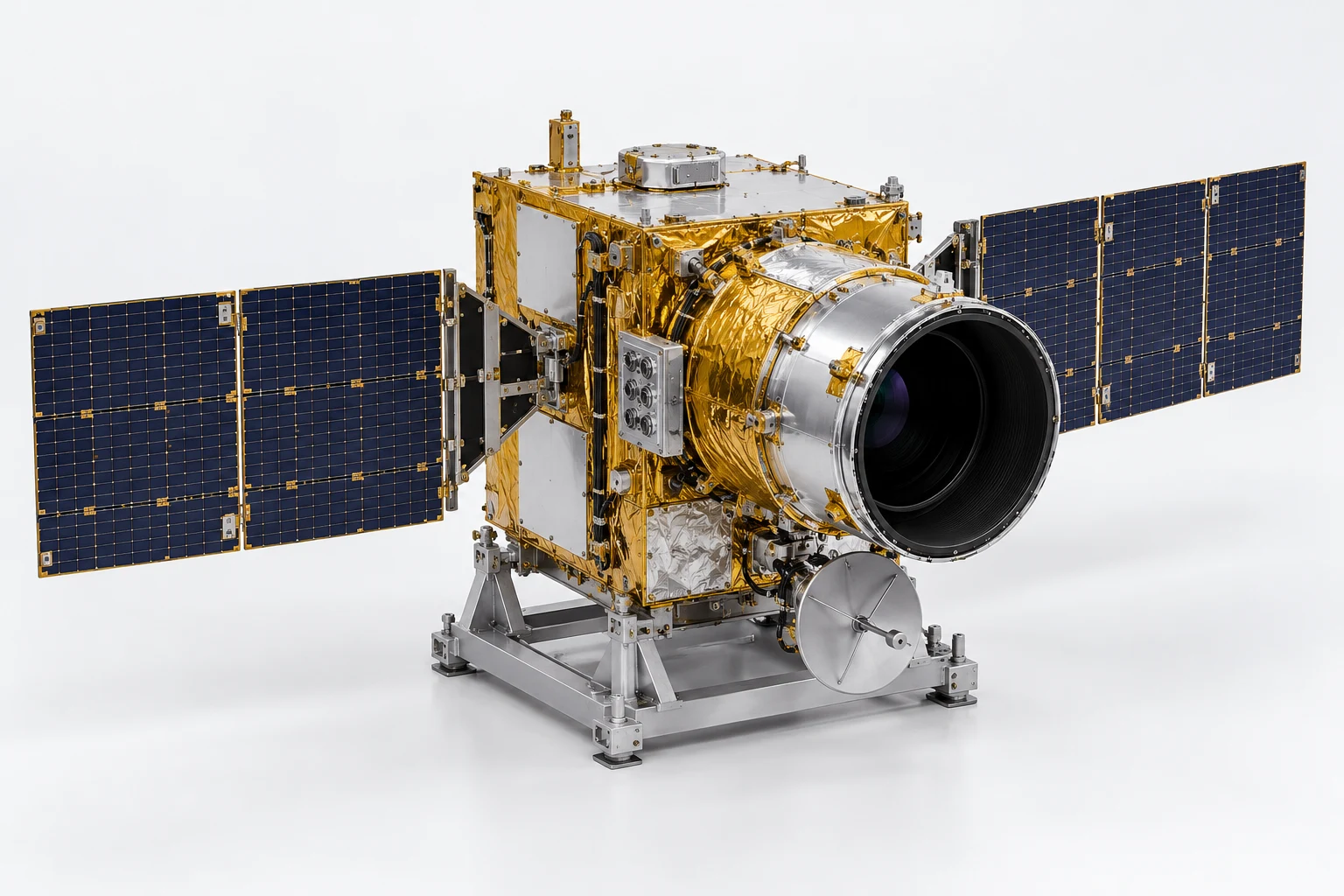
ESV-S06-SOP-01 · MODEL V3 · SIMULATION PROCEDURE
Optical head access and protective hood restoration
Practise accessing the optical head without disturbing its lens, harness or nearby service interfaces. Resolve a cover-selection error and restore the assembly to its protected baseline.
Before the exercise
Use the unpowered Earth-observation satellite on its support frame. Supply a no-contact zone for the optical surface, an authored hood parking pose and the access-cover sequence. Real cleanliness classes, alignment limits and handling methods require the programme procedure.
- 01
Identify the instrument and support
Select the support frame, spacecraft bus and optical head, then save the baseline pose and model revision.
Check The optical task must not move the independent support assembly.
supportbusoptics - 02
Set the protected work state
Mark the lens as a no-contact surface and establish the scenario isolation and controlled-access state.
Check The learner acknowledges the protected surface before any cover movement.
optics.lensoptics.rimoptics.hood - 03
Trace the instrument harness
Identify the optical harness and distinguish it from the bus side routes. Save the authored route used by this exercise.
Check Selecting a bus harness as the instrument connection is rejected.
optics.harnessharness.leftharness.right - 04
Resolve the cover mismatch
Present an instruction pointing to the bus hatch rather than the optical hood. Place a hold and identify the intended cover.
Check Opening the unrelated hatch after the mismatch is a critical error.
hatchoptics.hoodoptics.band - 05
Prepare the hood removal path
Preview the authored hood translation and its clearance from the rim and harness. Confirm the parked location.
Check The path must remain outside the configured optical no-contact zone.
optics.hoodoptics.rimoptics.harness - 06
Remove and park the hood
Release the exercise retention state and move the hood into its parked pose while keeping the optical head fixed.
Check Record the correct hood identity, path and parked state.
optics.hoodoptics.bandoptics - 07
Expose the access context
Identify the liner, lens and patch surfaces now accessible. Compare them with the supplied reference condition card.
Check A condition decision must cite the card or observed geometry, not invented internals.
optics.lineroptics.lensoptics.patch - 08
Restore the optical harness route
Use the scenario route reference to correct a displaced optical harness segment without changing the rear bus junction.
Check The target route is restored and the protected junction remains unchanged.
optics.harnessharness.rear.leftjunction.rear - 09
Prepare the hood for refit
Return the hood from its parked pose to the authored alignment point and compare orientation with the baseline.
Check A reversed or incomplete alignment prevents the seating action.
optics.hoodoptics.rimoptics.band - 10
Seat and retain the hood
Move the hood into its saved seated pose and restore the simulation retention state. Keep the lens untouched.
Check Assess seated pose and retention state against declared authoring criteria.
optics.hoodoptics.bandoptics.rim - 11
Verify the surrounding configuration
Confirm that the optical route, side connectors and unrelated hatch remain in the intended final states.
Check The comparison must identify both the corrected route and unchanged interfaces.
optics.harnessconnectors.leftconnectors.righthatch - 12
Hand over the protected instrument
Submit the cover-selection recovery, final pose comparison and evidence of the protected optical surface.
Check Complete only when access is closed and no unresolved protection hold remains.
opticsoptics.hoodoptics.lenssupport
Assessment and completion
Score object identification 20, optical protection 25, cover-discrepancy recovery 20, route and pose restoration 20 and evidence 15. Contact with the protected lens, moving the wrong hatch or unsupported retention assumptions triggers a stop.
Genesis authoring handoff
Author the hood as a declared detachable cover unless a verified mechanism is supplied. Use separate condition cards and protected envelopes. This exercise does not demonstrate optical performance, cleanliness certification or alignment accuracy; those require independent records.
Use the exact exported model and verify its import and component bindings before generation. This specification has not yet been executed as a Genesis lesson.
For concept-model training and authoring. Real hardware work uses the programme owner’s approved procedures and engineering limits.